A Composable Docker Environment for Every Claude Code Session

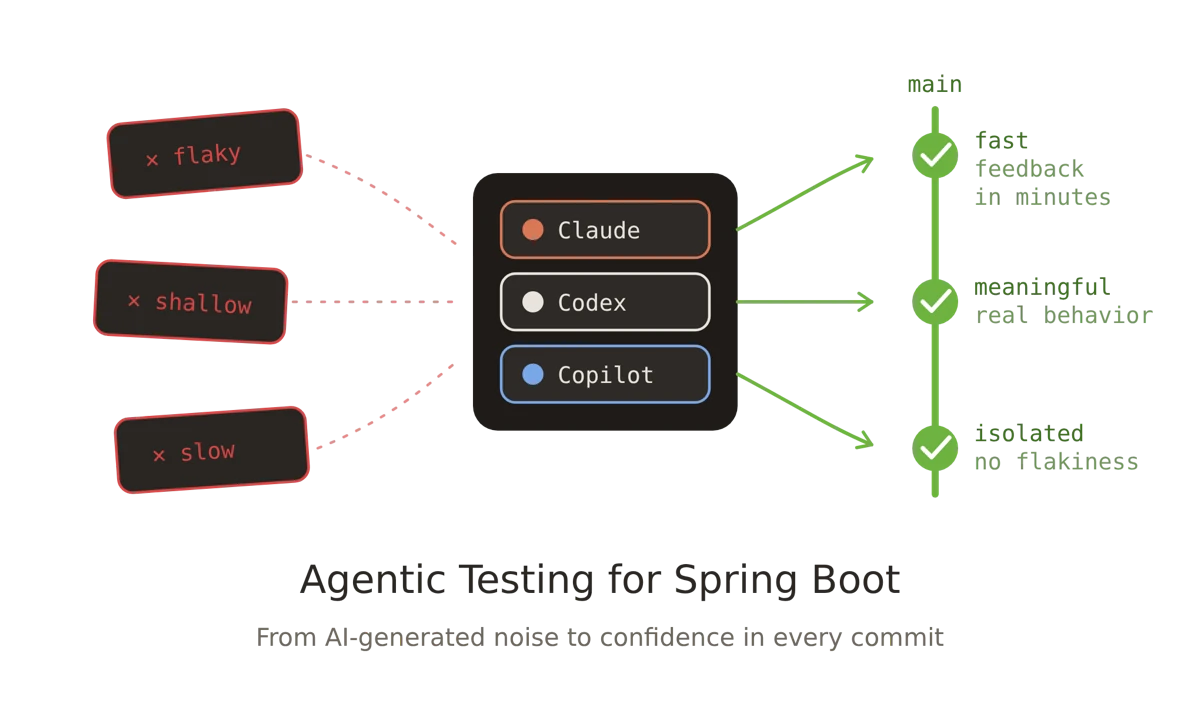
I usually work on several things in parallel: a feature in one Claude Code session, a bug fix in another and an experiment in a third. Git worktrees give each session its own copy of the code.
They don’t give each session its own running application. As soon as I want to click through the UI or check which email the app sends, the sessions compete for port 8080, share one database and see each other’s data and schema migrations.
My solution: every Claude Code session that starts in a worktree gets its own Docker Compose environment. A hook starts it in the background, and the Claude Code status line shows where to find it:
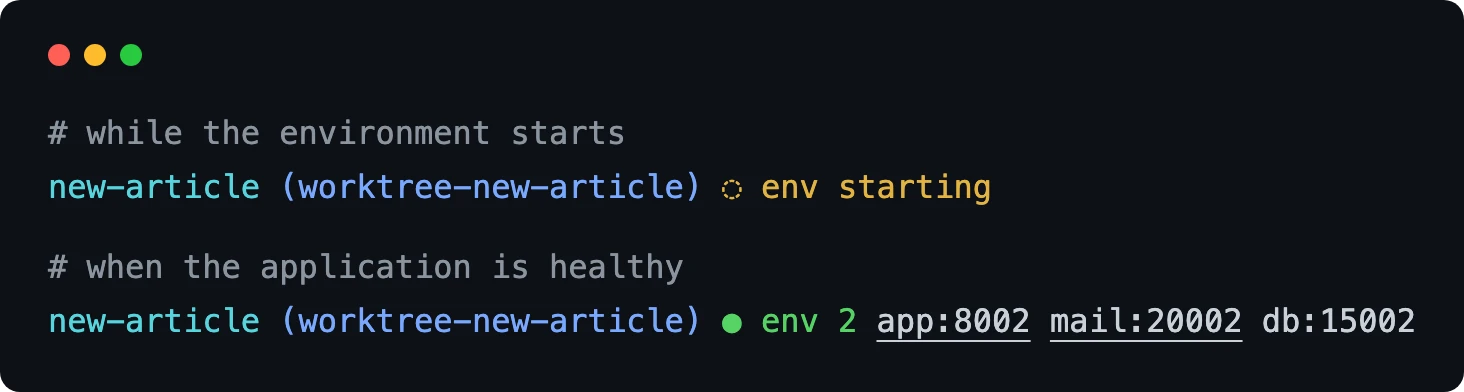
The status line output for a sample worktree, shown in a plain terminal frame.
With several sessions, this is the big picture:
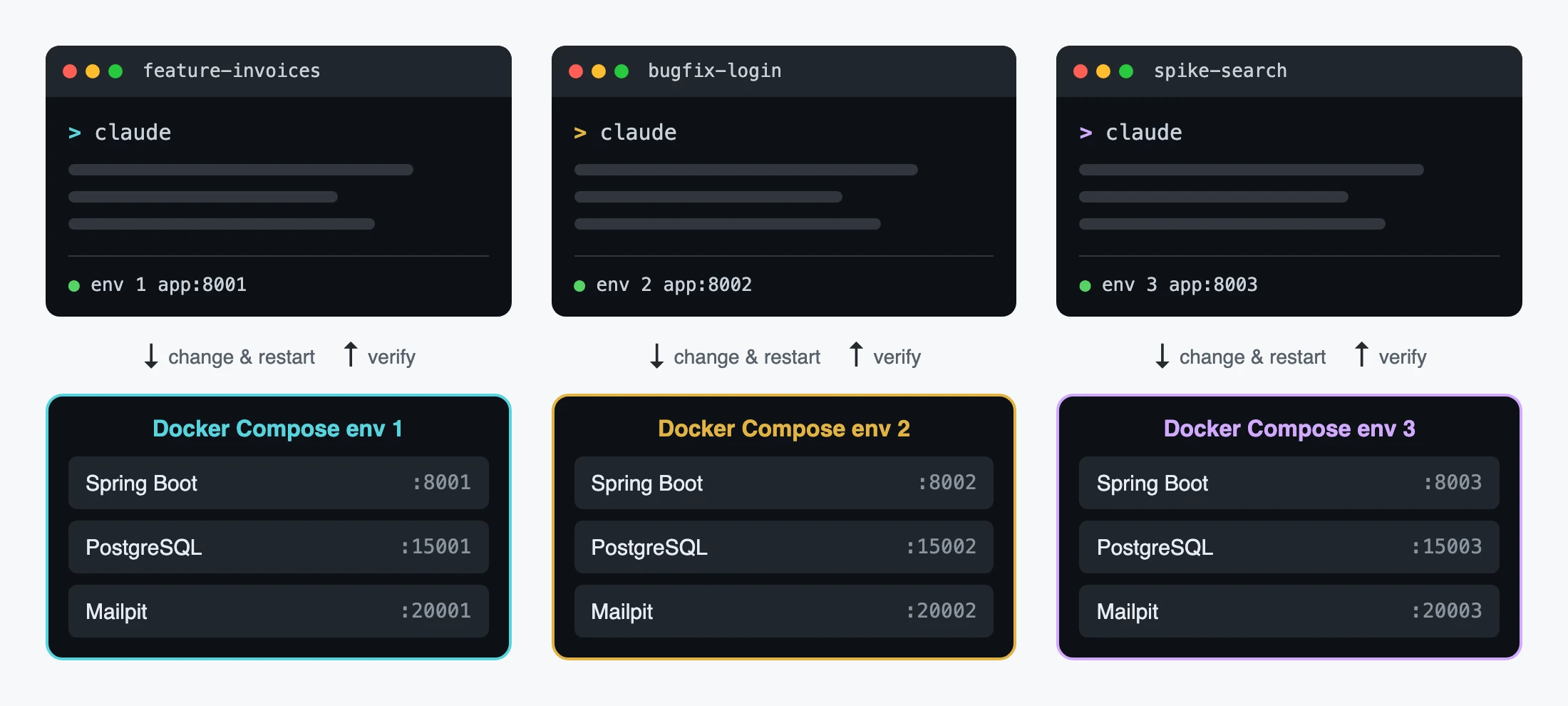
This closes the loop for agentic development. The agent doesn’t stop after writing code and running tests. It can restart the application, call the API, click through the UI with a browser tool such as Playwright, check the emails in Mailpit and query the database. If something is wrong, it fixes the code and checks again, without waiting for me and without disturbing the other sessions.
The price is hardware. Every session brings its own JVM, Maven process, PostgreSQL and Mailpit. If you run several sessions at once, you need a beefier machine with enough memory and CPU, especially when multiple environments start or compile at the same time.
I built this for a larger client project. This article shows a slimmed-down version for a typical Spring Boot application with PostgreSQL and Mailpit as a local mail trap.
The moving parts
The setup consists of a few files that you commit to your repository:
1.claude/
2  settings.json          # registers the hooks and the status line
3  hooks/
4    session-start.sh     # starts the environment
5    worktree-remove.sh   # destroys it together with the worktree
6    statusline.sh        # shows state and ports
7dev/
8  compose.yaml           # app, PostgreSQL, Mailpit
9  devenv.sh              # slots, ports and lifecycle
You need Docker with Compose, jq, curl and a Spring Boot application with the Maven setup and Spring Boot Actuator. Add .devenv/ to your .gitignore, as this folder holds the state of each environment. Make dev/devenv.sh executable.
The most important design decision: all logic lives in dev/devenv.sh, not in the hooks. The script works without Claude Code, so my teammates, my own terminal and the agent use the same commands. The hooks are only thin adapters.
The Docker Compose file
The whole stack runs in containers, including the Spring Boot application. Every host port comes from a variable:
 1services:
 2  app:
 3    image: maven:3.9-eclipse-temurin-25
 4    working_dir: /workspace
 5    command: mvn --batch-mode spring-boot:run
 6    ports:
 7      - "127.0.0.1:${APP_PORT}:8080"
 8    volumes:
 9      - ..:/workspace
10      # Keep the container build output away from the target/ folder of your IDE
11      - target:/workspace/target
12      - maven-repository:/root/.m2
13    environment:
14      SPRING_DATASOURCE_URL: jdbc:postgresql://postgres:5432/app
15      SPRING_DATASOURCE_USERNAME: app
16      SPRING_DATASOURCE_PASSWORD: app
17      SPRING_MAIL_HOST: mailpit
18      SPRING_MAIL_PORT: "1025"
19      # Cookies ignore the port, so each environment needs its own cookie name
20      SERVER_SERVLET_SESSION_COOKIE_NAME: SESSION_${DEVENV_SLOT}
21      # For absolute links, for example in emails (your own property)
22      APP_BASE_URL: http://localhost:${APP_PORT}
23    depends_on:
24      postgres:
25        condition: service_healthy
26      mailpit:
27        condition: service_started
28
29  postgres:
30    image: postgres:18
31    ports:
32      - "127.0.0.1:${DB_PORT}:5432"
33    environment:
34      POSTGRES_DB: app
35      POSTGRES_USER: app
36      POSTGRES_PASSWORD: app
37    volumes:
38      - postgres-data:/var/lib/postgresql
39    healthcheck:
40      # -h 127.0.0.1: the temporary server during the first init only uses the socket
41      test: ["CMD-SHELL", "pg_isready -h 127.0.0.1 -U app -d app"]
42      interval: 3s
43      retries: 20
44
45  mailpit:
46    image: axllent/mailpit:v1.29
47    ports:
48      - "127.0.0.1:${MAIL_PORT}:8025"
49
50volumes:
51  postgres-data:
52  target:
53  # Shared by all worktrees, so only the first start downloads the dependencies
54  maven-repository:
55    name: devenv-maven-repository
56    external: true
What makes this file safe to run several times in parallel:
- No
container_name. Compose prefixes containers, networks and volumes with the project name. A fixed name breaks this isolation, and the second environment fails to start. - Each environment has its own database volume. You can run a destructive Flyway migration in one worktree without affecting the others.
- Inside and outside use different addresses. The containers talk to
postgres:5432. Only your browser, IDE and the agent use the dynamic host ports. - Ports bind to
127.0.0.1. These services use throwaway credentials, so nobody else in your network should reach them. - The Maven repository is shared. This saves a full dependency download per worktree. Maven doesn’t guarantee safe concurrent writes by default, so if you see corrupt downloads, give each environment its own volume.
One slot per worktree
You could let Docker pick random host ports and ask for them with docker compose port. I prefer ports that I can read and that stay the same after a restart.
Each environment claims a slot between 1 and 99, and the slot defines all ports:
| Service | Port | Slot 1 | Slot 2 |
|---|---|---|---|
| App | 8000 + slot | 8001 | 8002 |
| PostgreSQL | 15000 + slot | 15001 | 15002 |
| Mailpit UI | 20000 + slot | 20001 | 20002 |
A small registry in ~/.devenv/slots records which worktree owns which slot. A stopped environment keeps its slot. The script also skips a slot if any of its three ports is in use by another process. This happened right away in my test: another project on my machine was listening on port 20001, so the first environment got slot 2.
  1#!/usr/bin/env bash
  2# One Docker Compose environment per git worktree.
  3# usage: dev/devenv.sh up|wait|status|logs|restart|down|destroy|gc
  4set -euo pipefail
  5
  6devDir="$(cd "$(dirname "${BASH_SOURCE[0]}")" && pwd)"
  7rootDir="$(dirname "$devDir")"
  8stateDir="$rootDir/.devenv"
  9stateFile="$stateDir/state.env"
 10slotsDir="${DEVENV_HOME:-$HOME/.devenv}/slots"
 11
 12# Folder name plus a path checksum: readable and unique
 13projectName() {
 14  local folderName pathChecksum
 15  folderName="$(basename "$rootDir" | tr '[:upper:]' '[:lower:]' | tr -c 'a-z0-9\n' '-')"
 16  pathChecksum="$(printf '%s' "$rootDir" | cksum | cut -d' ' -f1)"
 17  printf 'devenv-%s-%s' "$folderName" "$pathChecksum"
 18}
 19
 20# Linux: prefer ss, because lsof does not show the sockets of other users
 21portBusy() {
 22  if command -v ss >/dev/null 2>&1; then
 23    ss -Hltn "sport = :$1" | grep -q .
 24  else
 25    lsof -nP -iTCP:"$1" -sTCP:LISTEN >/dev/null 2>&1
 26  fi
 27}
 28
 29# Slot 3 means: app 8003, database 15003, mail UI 20003
 30claimSlot() {
 31  local slot basePort
 32  mkdir -p "$slotsDir"
 33  for slot in $(seq 1 99); do
 34    for basePort in 8000 15000 20000; do
 35      if portBusy $((basePort + slot)); then continue 2; fi
 36    done
 37    # noclobber makes this atomic: two parallel sessions cannot get the same slot
 38    if (set -o noclobber; printf '%s\n%s\n' "$rootDir" "$(projectName)" > "$slotsDir/$slot") 2>/dev/null; then
 39      mkdir -p "$stateDir"
 40      cat > "$stateFile" <<ENV
 41COMPOSE_PROJECT_NAME=$(projectName)
 42DEVENV_SLOT=$slot
 43APP_PORT=$((8000 + slot))
 44DB_PORT=$((15000 + slot))
 45MAIL_PORT=$((20000 + slot))
 46ENV
 47      return 0
 48    fi
 49  done
 50  echo "No free slot" >&2
 51  return 1
 52}
 53
 54compose() {
 55  [ -f "$stateFile" ] || { echo "No environment yet, run: dev/devenv.sh up" >&2; exit 1; }
 56  docker compose --env-file "$stateFile" -f "$devDir/compose.yaml" "$@"
 57}
 58
 59printStatus() {
 60  [ -f "$stateFile" ] || { echo "No environment yet, run: dev/devenv.sh up" >&2; exit 1; }
 61  # shellcheck disable=SC1090
 62  . "$stateFile"
 63  cat <<STATUS
 64Slot $DEVENV_SLOT ($COMPOSE_PROJECT_NAME)
 65  App         http://localhost:$APP_PORT
 66  Mailpit     http://localhost:$MAIL_PORT
 67  PostgreSQL  localhost:$DB_PORT (app/app)
 68STATUS
 69}
 70
 71waitForApp() {
 72  # shellcheck disable=SC1090
 73  . "$stateFile"
 74  for _ in $(seq 1 180); do
 75    if curl -sf -m 2 "http://localhost:$APP_PORT/actuator/health" >/dev/null; then
 76      printStatus
 77      return 0
 78    fi
 79    sleep 5
 80  done
 81  echo "App is not healthy, check: dev/devenv.sh logs app" >&2
 82  return 1
 83}
 84
 85# Remove environments of worktrees that no longer exist
 86collectGarbage() {
 87  local slotFile ownerDir ownerProject
 88  for slotFile in "$slotsDir"/*; do
 89    [ -f "$slotFile" ] || continue
 90    ownerDir="$(sed -n 1p "$slotFile")"
 91    ownerProject="$(sed -n 2p "$slotFile")"
 92    if [ -z "$ownerDir" ] || [ -d "$ownerDir" ]; then continue; fi
 93    echo "Removing orphaned environment $ownerProject"
 94    # Labels work even though the compose file is gone
 95    local filter="label=com.docker.compose.project=$ownerProject"
 96    # --volumes also removes anonymous volumes that an image declares
 97    docker ps -aq --filter "$filter" | xargs -r docker rm --force --volumes >/dev/null
 98    docker volume ls -q --filter "$filter" | xargs -r docker volume rm >/dev/null
 99    docker network ls -q --filter "$filter" | xargs -r docker network rm >/dev/null
100    rm -f "$slotFile"
101  done
102}
103
104command="${1:-}"
105[ $# -gt 0 ] && shift
106
107case "$command" in
108  up)
109    [ -f "$stateFile" ] || claimSlot
110    docker volume create devenv-maven-repository >/dev/null
111    compose up -d
112    printStatus
113    ;;
114  wait)    waitForApp ;;
115  status)  printStatus; compose ps ;;
116  logs)    compose logs -f --tail 200 "$@" ;;
117  restart) compose restart "${@:-app}" ;;
118  down)    compose stop ;;
119  destroy)
120    if [ -f "$stateFile" ]; then
121      # shellcheck disable=SC1090
122      . "$stateFile"
123      compose down --volumes --remove-orphans
124      rm -f "$slotsDir/$DEVENV_SLOT"
125      rm -rf "$stateDir"
126    fi
127    ;;
128  gc)      collectGarbage ;;
129  *)       echo "usage: dev/devenv.sh up|wait|status|logs|restart|down|destroy|gc" >&2; exit 1 ;;
130esac
After a Java change, dev/devenv.sh restart app restarts the application, and Maven compiles the new code on startup.
Start the environment with a SessionStart hook
Claude Code hooks are commands that run at fixed points of a session. The SessionStart hook receives JSON on stdin, including the cwd of the session.
My hook answers three questions: Does this repository have a dev environment script? Is this a linked worktree? Is Docker running? If all answers are yes, it starts the environment.
 1#!/usr/bin/env bash
 2# SessionStart hook: start the dev environment when the session runs in a worktree.
 3set -uo pipefail
 4
 5# Use cwd from the hook input: CLAUDE_PROJECT_DIR can point to another checkout
 6sessionDir="$(jq -r '.cwd // empty')"
 7[ -d "$sessionDir" ] || exit 0
 8
 9rootDir="$(git -C "$sessionDir" rev-parse --show-toplevel 2>/dev/null)" || exit 0
10devenvScript="$rootDir/dev/devenv.sh"
11[ -x "$devenvScript" ] || exit 0
12
13# Only linked worktrees: their git dir is <main checkout>/.git/worktrees/<name>
14gitDir="$(git -C "$rootDir" rev-parse --absolute-git-dir)"
15case "$gitDir" in */worktrees/*) ;; *) exit 0 ;; esac
16
17stateDir="$rootDir/.devenv"
18pidFile="$stateDir/up.pid"
19logFile="$stateDir/up.log"
20
21if ! docker info >/dev/null 2>&1; then
22  message="Dev environment not started: Docker is not running. Start Docker, then run dev/devenv.sh up."
23elif [ -f "$pidFile" ] && kill -0 "$(cat "$pidFile")" 2>/dev/null; then
24  message="Dev environment is still starting, log: .devenv/up.log."
25else
26  mkdir -p "$stateDir"
27  # Detached and fully redirected, so the hook returns at once
28  nohup bash -c '"$0" gc; "$0" up' "$devenvScript" > "$logFile" 2>&1 < /dev/null &
29  echo $! > "$pidFile"
30  message="A Docker Compose environment for this worktree starts in the background (app, PostgreSQL, Mailpit), log: .devenv/up.log. Before you check the UI or call the API, run dev/devenv.sh wait. Get the ports with dev/devenv.sh status and never assume port 8080."
31fi
32
33jq -n --arg context "$message" \
34  '{hookSpecificOutput: {hookEventName: "SessionStart", additionalContext: $context}}'
Three details matter here:
- Don’t block the session. The first start pulls images and downloads dependencies. The hook starts
devenv.sh upwithnohup, redirects all output to a log file and returns, so I can start prompting right away. - Tell the agent what happened. Claude Code adds the
additionalContexttext to the context of the session. Without it, the agent doesn’t know that an environment exists and may trylocalhost:8080, which can belong to a different branch. It would then “verify” its change against the wrong application. - Use
cwd, notCLAUDE_PROJECT_DIR, to find the worktree. The documentation notes thatCLAUDE_PROJECT_DIRstays at the project root where the session started, even when Claude moves into a worktree later.
Why not use a WorktreeCreate hook? It replaces the way Claude Code creates worktrees, and it also covers worktrees for subagents. I don’t want a full stack for each short-lived subagent.
Show the ports in the status line
With three environments, I can’t remember which one runs on which port. The status line solves this. It’s a script that gets session data as JSON on stdin and prints what Claude Code shows below the prompt.
 1#!/usr/bin/env bash
 2# Status line: directory, branch and the state of the dev environment.
 3# It runs often, so it only reads files and probes localhost. No docker calls.
 4input="$(cat)"
 5currentDir="$(printf '%s' "$input" | jq -r '.workspace.current_dir')"
 6rootDir="$(git -C "$currentDir" rev-parse --show-toplevel 2>/dev/null)"
 7branch="$(git -C "$currentDir" rev-parse --abbrev-ref HEAD 2>/dev/null)"
 8
 9printf '\033[36m%s\033[0m' "$(basename "$currentDir")"
10[ -n "$branch" ] && printf ' \033[34m(%s)\033[0m' "$branch"
11
12stateDir="$rootDir/.devenv"
13[ -n "$rootDir" ] && [ -d "$stateDir" ] || exit 0
14
15# OSC 8 escape sequence: a clickable link in terminals that support it
16link() { printf '\033]8;;%s\a%s\033]8;;\a' "$1" "$2"; }
17
18if [ -f "$stateDir/state.env" ]; then
19  # shellcheck disable=SC1091
20  . "$stateDir/state.env"
21  # An HTTP check on purpose: Docker opens the published port before the app listens
22  if curl -sf -m 0.3 "http://localhost:$APP_PORT/actuator/health" >/dev/null 2>&1; then
23    printf ' \033[32m● env %s\033[0m ' "$DEVENV_SLOT"
24    link "http://localhost:$APP_PORT" "app:$APP_PORT"
25    printf ' '
26    link "http://localhost:$MAIL_PORT" "mail:$MAIL_PORT"
27    printf ' db:%s' "$DB_PORT"
28    exit 0
29  fi
30fi
31
32if [ -f "$stateDir/up.pid" ] && kill -0 "$(cat "$stateDir/up.pid")" 2>/dev/null; then
33  printf ' \033[33m◌ env starting\033[0m'
34elif [ -f "$stateDir/state.env" ]; then
35  # Stopped, still booting or broken
36  printf ' \033[33m○ app:%s not ready, see .devenv/up.log\033[0m' "$APP_PORT"
37else
38  printf ' \033[31m✗ env failed, see .devenv/up.log\033[0m'
39fi
In terminals with OSC 8 support, such as iTerm2, Kitty or WezTerm, app:8002 and mail:20002 are clickable. On macOS, Cmd+click opens the UI of exactly this worktree.
Keep this script cheap. Claude Code runs it often, and a slow script delays the status line. Calling docker compose ps on every update is too much, so the script reads two small files and sends one request to localhost with a short timeout.
Wire it up
All three scripts are registered in the project settings:
 1{
 2  "hooks": {
 3    "SessionStart": [
 4      {
 5        "matcher": "startup",
 6        "hooks": [
 7          {
 8            "type": "command",
 9            "command": "bash \"$CLAUDE_PROJECT_DIR/.claude/hooks/session-start.sh\"",
10            "timeout": 30
11          }
12        ]
13      }
14    ],
15    "WorktreeRemove": [
16      {
17        "hooks": [
18          {
19            "type": "command",
20            "command": "bash \"$CLAUDE_PROJECT_DIR/.claude/hooks/worktree-remove.sh\"",
21            "timeout": 120
22          }
23        ]
24      }
25    ]
26  },
27  "statusLine": {
28    "type": "command",
29    "command": "bash \"$(git rev-parse --show-toplevel)/.claude/hooks/statusline.sh\"",
30    "refreshInterval": 5
31  }
32}
The startup matcher limits the hook to new sessions. It doesn’t run again when you resume or compact a session. If you resume after a reboot, or move into a worktree in the middle of a session, run dev/devenv.sh up yourself.
The refreshInterval re-runs the status line every five seconds. Otherwise it mainly updates on session activity and wouldn’t notice that the app became ready while the session is idle.
A project statusLine takes precedence over your personal one. If your team doesn’t want that, move this block to .claude/settings.local.json.
Then start a session in a new worktree:
1claude --worktree feature-invoicesClaude Code creates the worktree under .claude/worktrees/feature-invoices/, and the hook starts the environment. A new worktree doesn’t contain gitignored files. If your application needs a local .env file, list it in .worktreeinclude so that Claude Code copies it.
Clean up when the worktree goes away
Starting environments is easy. Forgetting them fills your disk with database volumes and your memory with idle JVMs.
 1#!/usr/bin/env bash
 2# WorktreeRemove hook. It REPLACES the default removal of Claude Code,
 3# so it has to delete the worktree itself.
 4set -uo pipefail
 5
 6worktreeDir="$(jq -r '.worktree_path // empty')"
 7[ -d "$worktreeDir" ] || exit 0
 8
 9if [ -x "$worktreeDir/dev/devenv.sh" ]; then
10  # A failure here must not block the removal, "devenv.sh gc" cleans up later
11  "$worktreeDir/dev/devenv.sh" destroy >&2 || echo "destroy failed" >&2
12fi
13
14commonGitDir="$(git -C "$worktreeDir" rev-parse --path-format=absolute --git-common-dir)"
15mainCheckout="${commonGitDir%/.git}"
16# Twice --force also removes locked worktrees
17git -C "$mainCheckout" worktree remove --force --force "$worktreeDir" >&2
Watch out for this one: a WorktreeRemove hook replaces the default removal. If your script only stops the containers and exits successfully, the worktree stays on disk. If you register it in your user settings instead of the project settings, it runs for all your repositories, so it must handle those without a dev/devenv.sh too.
The hook doesn’t cover everything. You might run git worktree remove yourself or delete the folder. That’s why the SessionStart hook runs devenv.sh gc before it starts an environment. gc stands for garbage collection: it removes the containers, volumes and networks of worktrees that no longer exist and frees their slots.
Pitfalls with parallel environments
Docker runs out of networks
Each Compose project creates its own network, and Docker only has a limited number of subnets for them. My machine has networks from many projects, and the second test environment failed with:
1failed to create network devenv-feature-b-2183867701_default: Error response from daemon: all predefined address pools have been fully subnettedFirst, check docker network ls for networks that you no longer need. docker network prune removes all networks that no container uses.
For a permanent fix, give Docker a larger address pool with smaller subnets in daemon.json (in Docker Desktop under Settings > Docker Engine), then restart Docker. Pick a range that doesn’t collide with your company network or VPN:
1{
2  "default-address-pools": [
3    { "base": "10.200.0.0/16", "size": 24 }
4  ]
5}
In my client setup I went a different way: all services share the network namespace of the PostgreSQL container (network_mode: service:postgres, similar to a Kubernetes pod), so no environment needs a network of its own. It works well but makes the Compose file harder to read, so start with the standard approach.
You get logged out when you switch tabs
Browsers don’t isolate cookies by port. localhost:8001 and localhost:8002 share the same cookies, so with the default name JSESSIONID, logging in to one environment overwrites the session of the other.
That’s why the Compose file sets SERVER_SERVLET_SESSION_COOKIE_NAME per slot. If you use Spring Session or your own cookies, such as a remember-me or token cookie, make their names depend on the slot as well.
Links point to the wrong environment
Inside the container, the application listens on port 8080. Your browser uses the port of the slot. Every URL that leaves the application, such as a link in an email or an OAuth redirect URI, needs the host port. Build these links from APP_BASE_URL, and open the email in Mailpit to check them.
Every environment costs resources
Each slot runs a JVM, Maven, PostgreSQL and Mailpit. Check the memory limit of Docker before you start many sessions, and use dev/devenv.sh down for environments that you don’t need right now. Their data and ports stay.
What about Spring Boot’s Docker Compose support and Testcontainers?
Spring Boot’s Docker Compose support is a good fit if you run the application on your host and want Spring Boot to start the backing services and wire the connections. Here, I want one command that manages the whole stack, including the application, with predictable ports per worktree.
This setup is also not a replacement for Testcontainers. It’s for exploring: clicking through the UI, checking an email or inspecting data. Your automated tests should still create their own infrastructure, so that they behave the same on every machine and in CI.
Summary
The workflow now looks like this:
claude --worktree <name>creates an isolated copy of the code.- The
SessionStarthook starts a matching environment in the background and tells the agent about it. - The status line shows when the app is ready and where it runs.
- Removing the worktree destroys the environment, and
gccatches the leftovers.
I no longer stop one application to look at another. The agent also gets a real running system to verify its work against, with a database that it can’t damage for anyone else.
You don’t have to type these scripts from scratch. Give your coding agent this article and ask it to adapt the setup to your stack. Then review the result, especially the cleanup part, before you let it delete anything.
Joyful testing,
Philip
How Do Java Teams Test with AI in 2026?
See what 614 developers said about Spring Boot testing and AI, and what 92 engineers say AI is doing to their pipelines and reviews.


- The AI Productivity Paradox Industry report - 11 pages
- Top 5 Investments Before You Scale Agentic Coding Leader guide - 3 pages
- Spring Boot Testing & AI Survey 2026 Live poll results - 4 pages
Get the results in your inbox
All three PDFs, sent to your email address.
Does it fail again? Write to info@pragmatech.digital and I send the PDFs manually.
Free. Unsubscribe anytime. Privacy policy